Buy sun-studio.eu ?
We are moving the project
sun-studio.eu .
Are you interested in purchasing the domain
sun-studio.eu ?
domain@kv-gmbh.de · 0541-91531010
Buy sun-studio.eu ?
What does silhouette mean?
A silhouette is the dark shape and outline of a person, object, or scene that is visible against a lighter background. It is typically a solid, black shape with no interior detail, created by the contrast between the object and the background. Silhouettes are often used in art and design to create striking and dramatic imagery. **
What is actually a silhouette?
A silhouette is the outline or shape of an object, person, or scene, typically seen as a solid color against a lighter background. It is a two-dimensional representation of the object, often in a simplified form without fine details or internal features. Silhouettes are commonly used in art, photography, and design to create striking and recognizable images. **


Similar search terms for Silhouette
Top-Angebote
Products related to Silhouette:
-
Calexotics Silhouette S2 PurpleHealth and Beauty Sexual health Calexotics Silhouette S2 Purple Silhouette s2 - purple fantastic shell shaped finger ring. It is soft, elastic and with an appropriate and ergonomic shape. You can control the intensity of the pleasure through a speed controller. It can be charged with usb. Discreet, effective and prepared to give pleasure to the most daring women.29,75 £*Shipping: 3,99 £Secure redirect to the provider
-
Gamarde Silhouette Cronobuster 200 mlHealth and Beauty Creams Gamarde Silhouette Cronobuster 200 ml Inspired by the latest studies in chronobiology. Balances the natural phases of accumulation and destruction of fat cells. During the day, it facilitates the elimination of fat and prevents its storage during the night. composition: Alque, coral, papaya, argan oil. USE: Morning and night, energetically massage the skin with circular movements, concentrating on difficult areas (thighs, hips, buttocks, stomach, etc.). Emphasize the effectiveness of the exfoliating treatment once per once or twice per week.17,44 £*Shipping: 3,99 £Secure redirect to the provider
-
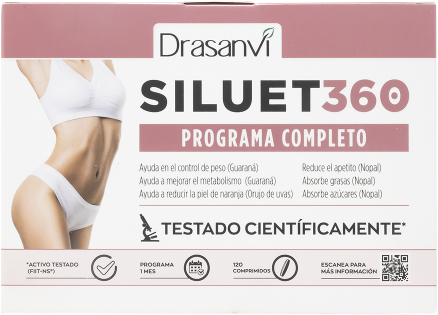
Drasanvi Silhouette 360 120 CapsulesNutrition and Supplements Special supplements Drasanvi Silhouette 360 120 Capsules Siluet 360 is a dietary supplement designed for weight loss, featuring a formula based on plant extracts, vitamins, minerals, and the innovative Fiit-ns complex, supported by clinical studies. - Its main ingredients are nopal, Ascophyllum, Coffea arabica, L-Tyrosine, hyaluronic acid, zinc and chromium. - To this we must add the blend of polyphenol-rich extracts from guarana, carrot, green tea, grapefruit, and grapes, which make up the Fiit-ns complex. In this sense, Fiit-ns has been clinically proven to improve metabolic markers of the aging process and contains Vitamin B3, which helps increase energy levels and reduce the feeling of fatigue. Instructions for Use: Take two tablets on an empty stomach and two tablets at noon before meals for 30 days.22,99 £*Shipping: 3,99 £Secure redirect to the provider


-
How can one photograph a silhouette?
To photograph a silhouette, you need to position your subject in front of a bright light source, such as the sun or a bright artificial light. Place the light source behind your subject so that it creates a strong backlight. Then, adjust your camera settings to expose for the background light, which will result in your subject appearing as a dark silhouette against the bright background. You may need to use a lower exposure setting or adjust your aperture and ISO to achieve the desired effect. **
-
How to create such silhouette skyline images?
To create silhouette skyline images, you can start by finding a location with a clear view of the skyline during sunrise or sunset. Position yourself so that the sun is behind the buildings, casting a shadow on the skyline. Use a camera with manual settings to adjust the exposure to capture the silhouette effect. You can also enhance the contrast and saturation during post-processing to make the silhouette stand out even more. **
-
How can one edit images into silhouette?
To create a silhouette image, one can use photo editing software such as Adobe Photoshop or GIMP. First, open the image in the software and use the selection tool to outline the subject of the image. Then, invert the selection so that the background is selected instead of the subject. Next, fill the selected area with black to create the silhouette effect. Finally, save the edited image as a new file to preserve the original. **
-
What does the silhouette of Caspar Dilly look like?
The silhouette of Caspar Dilly is tall and slender, with a slightly hunched posture. His head is crowned with a mop of curly hair, and his angular features are highlighted by a prominent nose and sharp jawline. He often carries himself with an air of quiet confidence, and his silhouette exudes a sense of mystery and intrigue. **

Does anyone know which brand this silhouette logo belongs to?
Without more specific information or context, it is difficult to determine which brand the silhouette logo belongs to. It could belong to a variety of companies or organizations. Additional details such as the industry or type of product associated with the logo would be helpful in identifying the brand. **
How do I cut out my silhouette accurately in GIMP?
To cut out your silhouette accurately in GIMP, you can use the "Free Select" tool to carefully trace around the outline of your silhouette. Once you have completed the outline, right-click and select "Layer via Cut" to separate the silhouette from the background. You can then use the "Eraser" tool to clean up any rough edges and refine the silhouette. Additionally, using the "Feather" tool can help soften the edges for a more natural look. Finally, you can place your silhouette on a new background or save it as a transparent image. **
Top-Angebote
Products related to Silhouette:
-
Calexotics Silhouette S2 PurpleHealth and Beauty Sexual health Calexotics Silhouette S2 Purple Silhouette s2 - purple fantastic shell shaped finger ring. It is soft, elastic and with an appropriate and ergonomic shape. You can control the intensity of the pleasure through a speed controller. It can be charged with usb. Discreet, effective and prepared to give pleasure to the most daring women.29,75 £*Shipping: 3,99 £Secure redirect to the provider
-
What does silhouette mean?
A silhouette is the dark shape and outline of a person, object, or scene that is visible against a lighter background. It is typically a solid, black shape with no interior detail, created by the contrast between the object and the background. Silhouettes are often used in art and design to create striking and dramatic imagery. **
-
What is actually a silhouette?
A silhouette is the outline or shape of an object, person, or scene, typically seen as a solid color against a lighter background. It is a two-dimensional representation of the object, often in a simplified form without fine details or internal features. Silhouettes are commonly used in art, photography, and design to create striking and recognizable images. **
-
How can one photograph a silhouette?
To photograph a silhouette, you need to position your subject in front of a bright light source, such as the sun or a bright artificial light. Place the light source behind your subject so that it creates a strong backlight. Then, adjust your camera settings to expose for the background light, which will result in your subject appearing as a dark silhouette against the bright background. You may need to use a lower exposure setting or adjust your aperture and ISO to achieve the desired effect. **
-
How to create such silhouette skyline images?
To create silhouette skyline images, you can start by finding a location with a clear view of the skyline during sunrise or sunset. Position yourself so that the sun is behind the buildings, casting a shadow on the skyline. Use a camera with manual settings to adjust the exposure to capture the silhouette effect. You can also enhance the contrast and saturation during post-processing to make the silhouette stand out even more. **
Similar search terms for Silhouette
-
Gamarde Silhouette Cronobuster 200 mlHealth and Beauty Creams Gamarde Silhouette Cronobuster 200 ml Inspired by the latest studies in chronobiology. Balances the natural phases of accumulation and destruction of fat cells. During the day, it facilitates the elimination of fat and prevents its storage during the night. composition: Alque, coral, papaya, argan oil. USE: Morning and night, energetically massage the skin with circular movements, concentrating on difficult areas (thighs, hips, buttocks, stomach, etc.). Emphasize the effectiveness of the exfoliating treatment once per once or twice per week.17,44 £*Shipping: 3,99 £Secure redirect to the provider
-
Drasanvi Silhouette 360 120 CapsulesNutrition and Supplements Special supplements Drasanvi Silhouette 360 120 Capsules Siluet 360 is a dietary supplement designed for weight loss, featuring a formula based on plant extracts, vitamins, minerals, and the innovative Fiit-ns complex, supported by clinical studies. - Its main ingredients are nopal, Ascophyllum, Coffea arabica, L-Tyrosine, hyaluronic acid, zinc and chromium. - To this we must add the blend of polyphenol-rich extracts from guarana, carrot, green tea, grapefruit, and grapes, which make up the Fiit-ns complex. In this sense, Fiit-ns has been clinically proven to improve metabolic markers of the aging process and contains Vitamin B3, which helps increase energy levels and reduce the feeling of fatigue. Instructions for Use: Take two tablets on an empty stomach and two tablets at noon before meals for 30 days.22,99 £*Shipping: 3,99 £Secure redirect to the provider
-
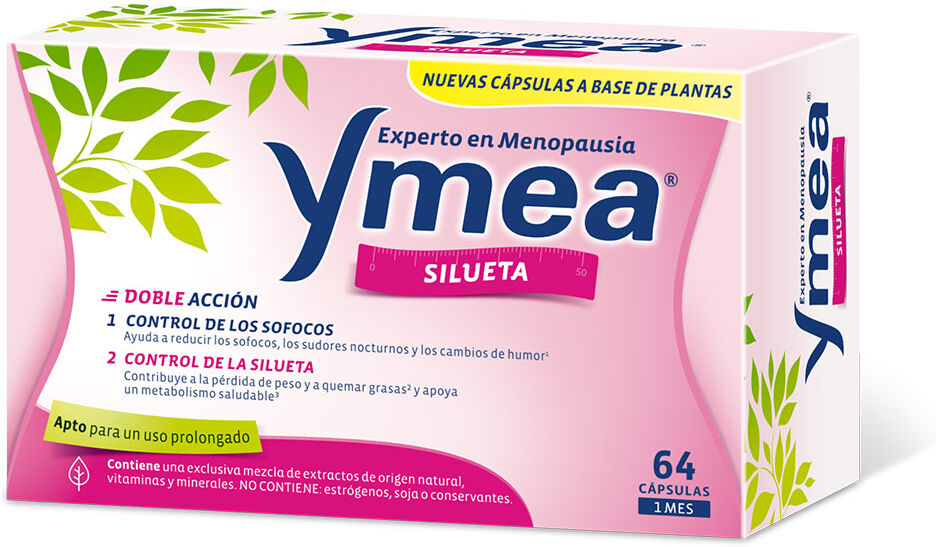
Ymea Silhouette New Formula 64 CapsulesNutrition and Supplements Natural Extracts Ymea Silhouette New Formula 64 Capsules What is Ymea Silueta New Formula 64 Capsules? Ymea Silueta New Formula 64 Capsules is a dietary supplement designed specifically for women undergoing menopause who want to relieve hormonal symptoms and control weight gain. Its improved formula combines natural plant extracts, vitamins, and minerals that help balance the body effectively without the use of hormones. Thanks to ingredients like sage, green tea, chromium, and vitamin B6, this product works to support your metabolism, hormonal balance, and the nervous system. By incorporating Ymea Silueta New Formula into your daily routine, you can improve your overall well-being, manage your weight, and reduce discomforts like hot flashes, night sweats, and irritability. Who is it for? This supplement is designed for women going through perimenopause or menopause who want to maintain their physical and emotional well-being without adding artificial hormones to their bodies. Women over 40 years of age who begin to experience symptoms of menopause. Those who want to take care of their figure during hormonal changes. People with mood, sleep, or energy changes associated with menopause. Women seeking a natural alternative to improve their quality of life. How do I apply it? Taking Ymea Silueta New Formula is very simple and easily fits into your daily routine: Take 2 capsules daily, preferably in the morning with a glass of water. It can be taken with breakfast for better absorption. Continuous treatment of at least 3 months is recommended to notice results. Do not exceed the recommended daily dose. Use of the product. Continued use of Ymea Silueta New Formula 64 Capsules can improve various aspects of women's well-being during menopause: Relieves hot flashes and night sweats thanks to the action of sage. Promotes body weight control with the support of green tea and chromium. It helps maintain energy and vitality throughout the day. Helps stabilize mood and improve sleep. Supports normal hormonal function with vitamin B6. Buy Ymea Silueta New Formula 64 Capsules Buying Ymea Silueta New Formula 64 Capsules is a smart choice for taking care of your health during a time of change. It's a natural, safe, and hormone-free formula, ideal for women looking to feel good inside and out. In our online store, you can purchase this product with complete confidence, at the best price, and with fast shipping. Ymea Silueta has become one of the most recommended supplements for its effectiveness and visible benefits in just a few weeks. Ymea Silueta New Formula 64 Capsules: natural wellness, hormonal balance and weight control during menopause.52,65 £*Shipping: 3,99 £Secure redirect to the provider
-
How can one edit images into silhouette?
To create a silhouette image, one can use photo editing software such as Adobe Photoshop or GIMP. First, open the image in the software and use the selection tool to outline the subject of the image. Then, invert the selection so that the background is selected instead of the subject. Next, fill the selected area with black to create the silhouette effect. Finally, save the edited image as a new file to preserve the original. **
-
What does the silhouette of Caspar Dilly look like?
The silhouette of Caspar Dilly is tall and slender, with a slightly hunched posture. His head is crowned with a mop of curly hair, and his angular features are highlighted by a prominent nose and sharp jawline. He often carries himself with an air of quiet confidence, and his silhouette exudes a sense of mystery and intrigue. **
-
Does anyone know which brand this silhouette logo belongs to?
Without more specific information or context, it is difficult to determine which brand the silhouette logo belongs to. It could belong to a variety of companies or organizations. Additional details such as the industry or type of product associated with the logo would be helpful in identifying the brand. **
-
How do I cut out my silhouette accurately in GIMP?
To cut out your silhouette accurately in GIMP, you can use the "Free Select" tool to carefully trace around the outline of your silhouette. Once you have completed the outline, right-click and select "Layer via Cut" to separate the silhouette from the background. You can then use the "Eraser" tool to clean up any rough edges and refine the silhouette. Additionally, using the "Feather" tool can help soften the edges for a more natural look. Finally, you can place your silhouette on a new background or save it as a transparent image. **
* All prices are inclusive of VAT and, if applicable, plus shipping costs. The offer information is based on the details provided by the respective shop and is updated through automated processes. Real-time updates do not occur, so deviations can occur in individual cases. ** Note: Parts of this content were created by AI.